
CulerLearn for Android
Learn on your phone
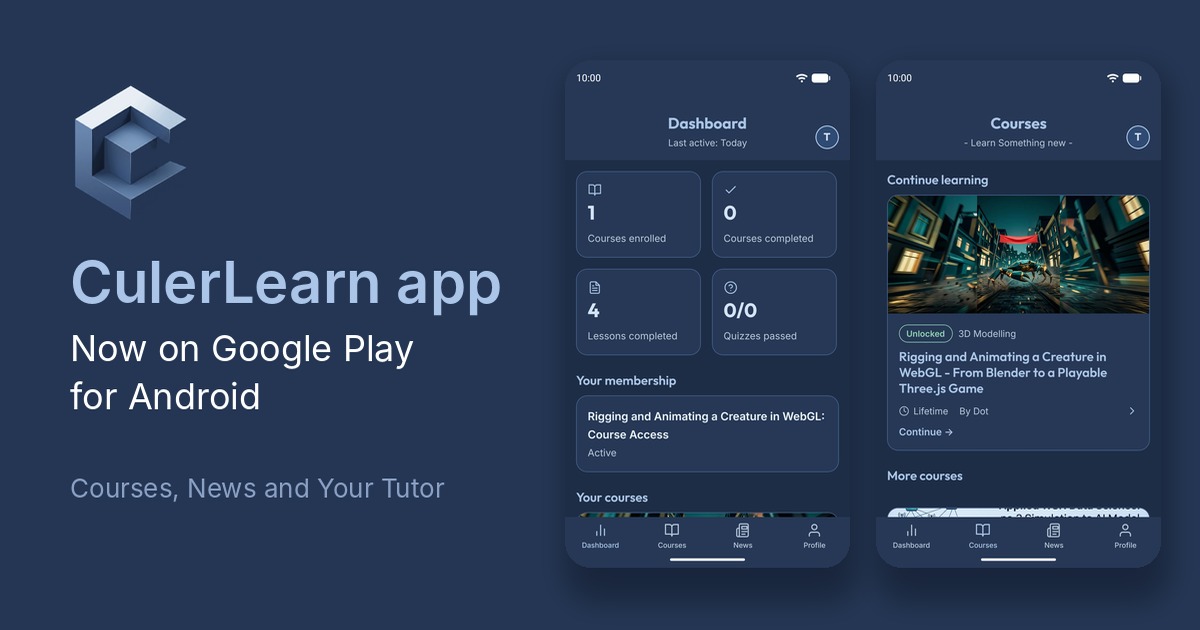
Your courses, lessons and posts, together in one dark, easy-on-the-eyes app. It is free to install.
What You Can Do Now
Everything below is in the app today.
Your learning
- Dashboard. See your courses and lessons completed at a glance, along with your memberships and the courses they unlock.
- Courses. Browse our courses with the price, tutor, duration, level and number of lessons. Courses still being prepared are marked Coming soon.
- Buy a course. Some courses are a one-time purchase, paid through Google Play. If you change phone, tap Restore purchase to get your course back.
- Lessons. Read lessons with text, images and downloadable course materials such as PDFs.
- Video lessons. Watch lesson videos inside the app. You never have to leave it.
Memberships
- See every membership. Monthly, fixed-term and lifetime memberships are listed with their price, what they offer and the courses they include.
- Your plan. Your current membership and when it ends are shown on your dashboard.
Reading and sharing
- Posts. Read CulerLearn posts as clean cards. They are saved on your phone so they open quickly, and they update when new ones are published.
- Comments. Read the comments on a post, reply to them and add your own.
- Share. Send a post straight to WhatsApp, Facebook, X, LinkedIn, Telegram or any other app on your phone.
- Books and Materials. Read about CulerLearn books, such as Wired for Innovation, with a button to view them on Amazon.
Help and policies
- Help. Find answers to common questions, sorted into clear categories.
- Terms and policies. Read the Terms of Service, Privacy Policy, Data Usage Policy and Refund Policy inside the app.
Made for you
- Dark design. A calm teal-and-charcoal look that is easy to read.
- You control your storage. Choose how much space the app uses on your phone, or clear what it has saved.
- Your privacy. The app asks before gathering any anonymous usage information, and you can change your mind at any time in Settings. It never includes your name, email or password.
- Safe sign-in. Your sign-in is kept in your phone's secure storage.
- Your profile. See your name and email, and sign out whenever you like.
Courses in the App
Free courses in 3D modelling, Python, computer vision and more are open now, with others on the way. See every course, grouped by topic, and how to start with a free one.
See all courses and how the app works →Coming Soon
We are still building these. They are not in the app yet.
Coming soonFree previews of selected lessonsReset your password from the sign-in screenDelete your account from the appCreate an account in the appDownload lessons to watch offline
An iPhone and iPad version is coming in the near future, following the Android launch. We will announce it here and by email.
Good to Know
- Works on Android 7.0 and newer.
- Free to install. Some courses are a one-time purchase in the app, paid through Google Play. You can also join on culerlearn.com.
- Some features need an internet connection, such as watching lesson videos.
- Our games and 3D simulations, such as the crab game, run in your browser, not in the app. Try them on the website.
How to Get It
Android
CulerLearn is free to install from Google Play. It works on Android 7.0 and newer.
iPhone and iPad
An iOS version is coming in the near future. This page will be updated when it is available.
Your data: the app uses a device identifier to deliver your messages and notifications, and only asks before collecting anonymous usage information. See the privacy policy for details.